Auto Signal Paths
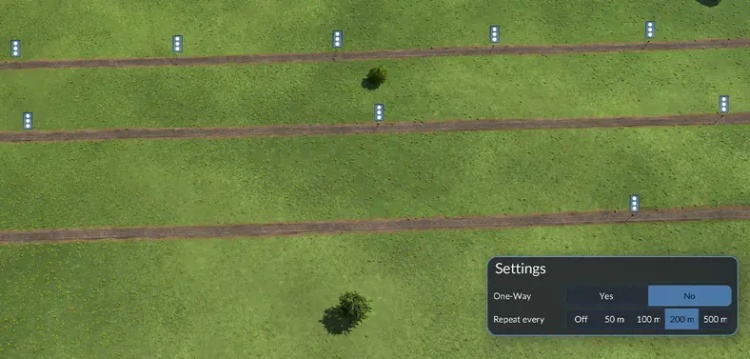
Download Auto Signal Paths mod for Transport Fever 3.
Signalling a long line by hand means clicking a path signal down every few hundred metres, across the whole map. GW Auto Signal Paths does it for you: place one signal and the track on both sides of it fills with signals at the spacing you choose.
What it does?
-Adds a Repeat every option to the path signal tool: Off, 50 m, 100 m, 200 m or 500 m.
-Place a single path signal with a distance picked, and signals are added along the track in both directions at that spacing.
-Filling stops at the next junction, station or end of track on each side, so it never runs into your switches or platforms.
-Every new signal faces the same way as the one you placed and uses the same One-Way setting, so a two-track line gets one direction per track.
-Signals already on the track are kept. The spacing restarts after each of them, and no new signal is placed right next to an existing one.
-New signals cost the same as ones you place by hand.
How to install:
- Extract the archive into your mod folder:
...\Steam\userdata\YOUR_ID\3493540\local\staging_area\
(Make sure the gw_signal_spacing_1 folder sits directly inside staging_area.)
Note: YOUR_ID is your Steam account folder - pick the one that contains 3493540.
- Launch the game, open the Mod Hub, find GW Signal Spacing under your mods, and click Activate.
Authors: Kres K
 Uploaded by